Automation · 06
WhatsApp Room Booking Assistant
A WhatsApp assistant for a church's room booking system. Registered users text it in English, Tagalog or Taglish to check if a room is free, see a room's schedule or their own bookings, and submit a booking request without opening the booking website. Every availability answer comes from the booking system itself, other open times or rooms are suggested when a room is taken, and each request goes in as pending for the church office to approve.
- Stack
- n8n
- WhatsApp Cloud API
- OpenAI
- REST API
01 / 02
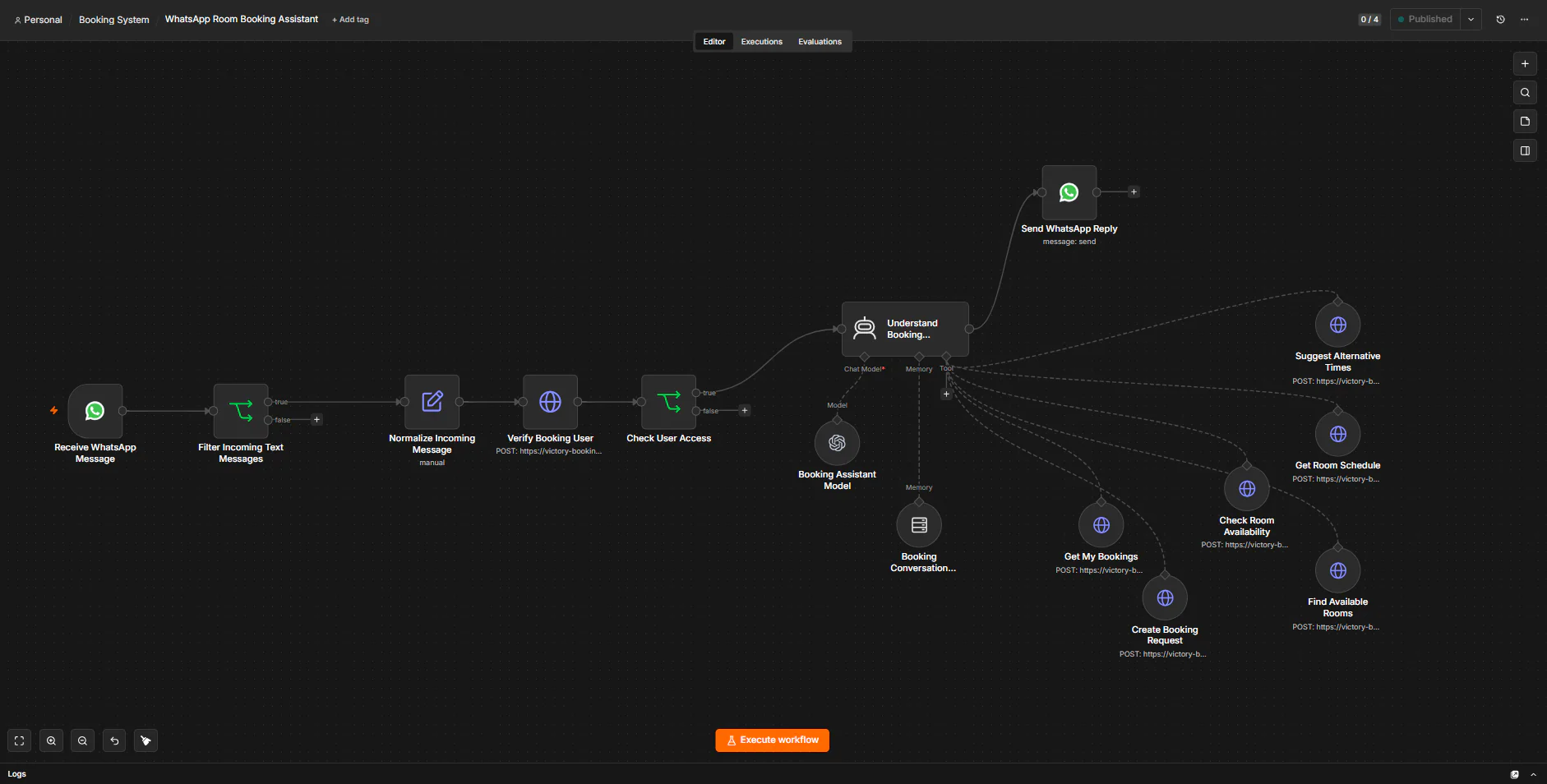
Image 1 of 2: n8n canvas of the WhatsApp Room Booking Assistant workflow
Overview
The problem. Church rooms are shared, so booking one means checking whether the room is free at that time, looking for another slot or room when it isn't, and then submitting the event details for the church office to approve. On the booking website that takes several steps, and people need to know that a submitted request is still only pending.
What I built. I built a WhatsApp assistant in n8n that people can simply text. It first asks the booking system whether the sender's number belongs to an active user, and anyone else gets no reply. An AI agent on OpenAI's GPT-5 mini then understands the request, remembers the recent conversation and uses six booking-system tools: check a room, find free rooms, show a room's schedule, suggest other times, list the sender's own bookings and create a booking request. The sender's number always comes from WhatsApp rather than from the AI, the agent is told to show other people's bookings only as Reserved, and after a request the reply says clearly that it's pending, not approved.
Why it helps. People can check rooms and request a booking from a WhatsApp chat, availability always comes from the booking system, and every request is described as pending until the church office approves it, with an email to follow.
System flow
- A text to the booking number starts the run. Anything that isn't a text message stops here. Nodes: WhatsApp Trigger (Receive WhatsApp Message); IF (Filter Incoming Text Messages). Next: Read the message.
- Keeps the sender's number, name, text and WhatsApp message ID. Nodes: Edit Fields (Set) (Normalize Incoming Message). Next: Verify the user.
- The booking system looks up the number. Only an active user goes on; anyone else gets no reply. Nodes: HTTP Request · Booking system API (Verify Booking User); IF (Check User Access). Next: Booking assistant.
- An AI agent on GPT-5 mini reads the request in the sender's language, remembers the recent chat for that number and picks the booking tools to call. Nodes: AI Agent (Understand Booking Request); OpenAI Chat Model (Booking Assistant Model); Simple Memory (Booking Conversation Memory). Next: WhatsApp reply, Check availability, Alternatives & requests.
- Asks the booking system if a room is free, which rooms are free, or what a room's day looks like. Other people's bookings show only as Reserved. Nodes: HTTP Request Tool · Booking system API ×3 (Check Room Availability, Find Available Rooms, Get Room Schedule). End of flow.Gets other open times when a slot is taken (same length where it can), lists the sender's own bookings, or submits a request. Every new request is pending admin approval. Nodes: HTTP Request Tool · Booking system API ×3 (Suggest Alternative Times, Get My Bookings, Create Booking Request). End of flow.Sends the answer back to the sender. After a request, it says it's pending, not approved, and that an email will follow. Nodes: WhatsApp Business Cloud (Send WhatsApp Reply). End of flow.