Automation · 11
Catering Order & Event Automations
GoHighLevel automations that carry each catering order from confirmation to event day. Payment-stage workflows, event-date reminders and a social-media order assistant replace manual follow-ups, so customers hear from the business at the right time and staff can see where every order stands.
- Built for
- Spandis CateringCatering business
- Stack
- GoHighLevel
- Workflows
- Conversation AI
- Pipelines
- Forms
01 / 03
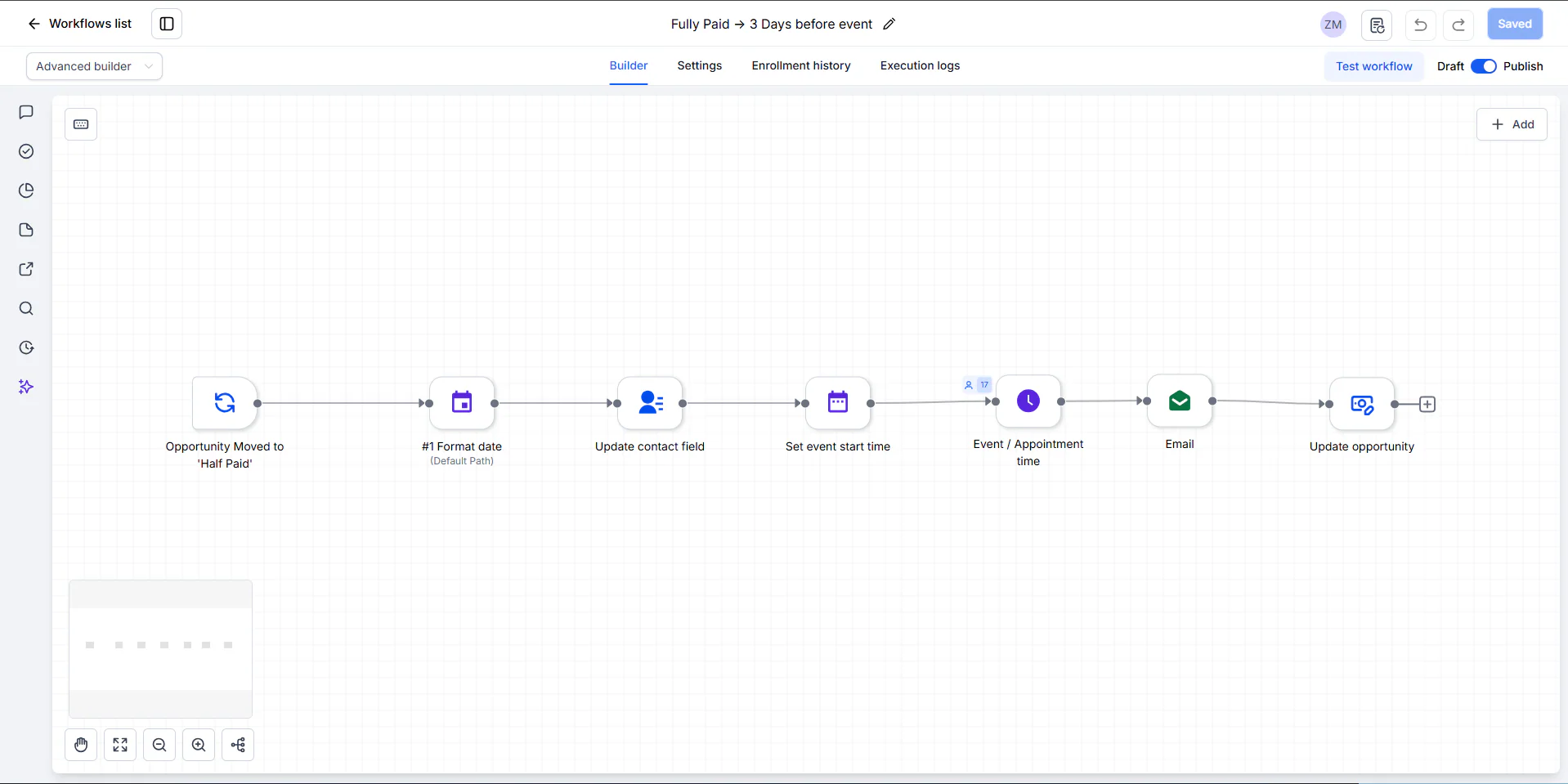
Image 1 of 3: GoHighLevel workflow: Fully Paid → 3 Days before event
Overview
The problem. A catering order goes through several steps before the event: confirmation, half or full payment, payment proof, then reminders as the date gets close. Handling every customer by hand, across social-media messages and the CRM, leads to missed reminders and staff checking each order one by one.
What I built. I built the order workflows in GoHighLevel: order confirmation, payment-stage workflows for half-paid and fully paid orders, payment-proof handling, and an event countdown that moves each order from three days out to the day before and on to a kitchen pipeline. A Conversation AI assistant handles social-media order enquiries and asks for missing contact details, and a referral form creates a tagged opportunity and alerts the team.
Why it helps. Customers get confirmations and event reminders on time, and the team follows each order in the pipeline instead of tracking it by hand.
System flow
3 workflows
Fully Paid → 3 Days before eventFormats the event date, waits for it, sends the reminder and moves the order on.7 steps
- Starts when the opportunity moves to the payment stage. Nodes: Opportunity Moved to 'Half Paid' (trigger, as named on the canvas). Next: Format the event date.
- Nodes: #1 Format date. Next: Save to the contact.
- Nodes: Update contact field. Next: Set event start time.
- Nodes: Set event start time. Next: Wait for the event time.
- Waits relative to the event date set before. Nodes: Event / Appointment time (Wait). Next: Reminder email.
- Nodes: Email. Next: Update opportunity.
- Moves the order on, where '3 Days before event → Tomorrow's Event' takes over. Nodes: Update opportunity. End of flow.
Also in the account: Order Confirmation Workflow · Order Confirmation → Upcoming Event · Half Paid → 3 Days before event · 3 Days before event → Tomorrow's Event · Tomorrow's Event → Today's Order Kitchen Pipeline (draft) · Payment Proof Submitted.