Automation · 13
Appointment Booking Follow-up
GoHighLevel workflows for a Manila business that takes appointments. A booking creates the opportunity, confirms by email and alerts the team, and later steps follow up and keep the pipeline current when a customer clicks a link or an appointment's status changes.
- Built for
- NailandiaAppointment-based business, Manila
- Stack
- GoHighLevel
- Workflows
- Calendars
- Pipelines
01 / 03
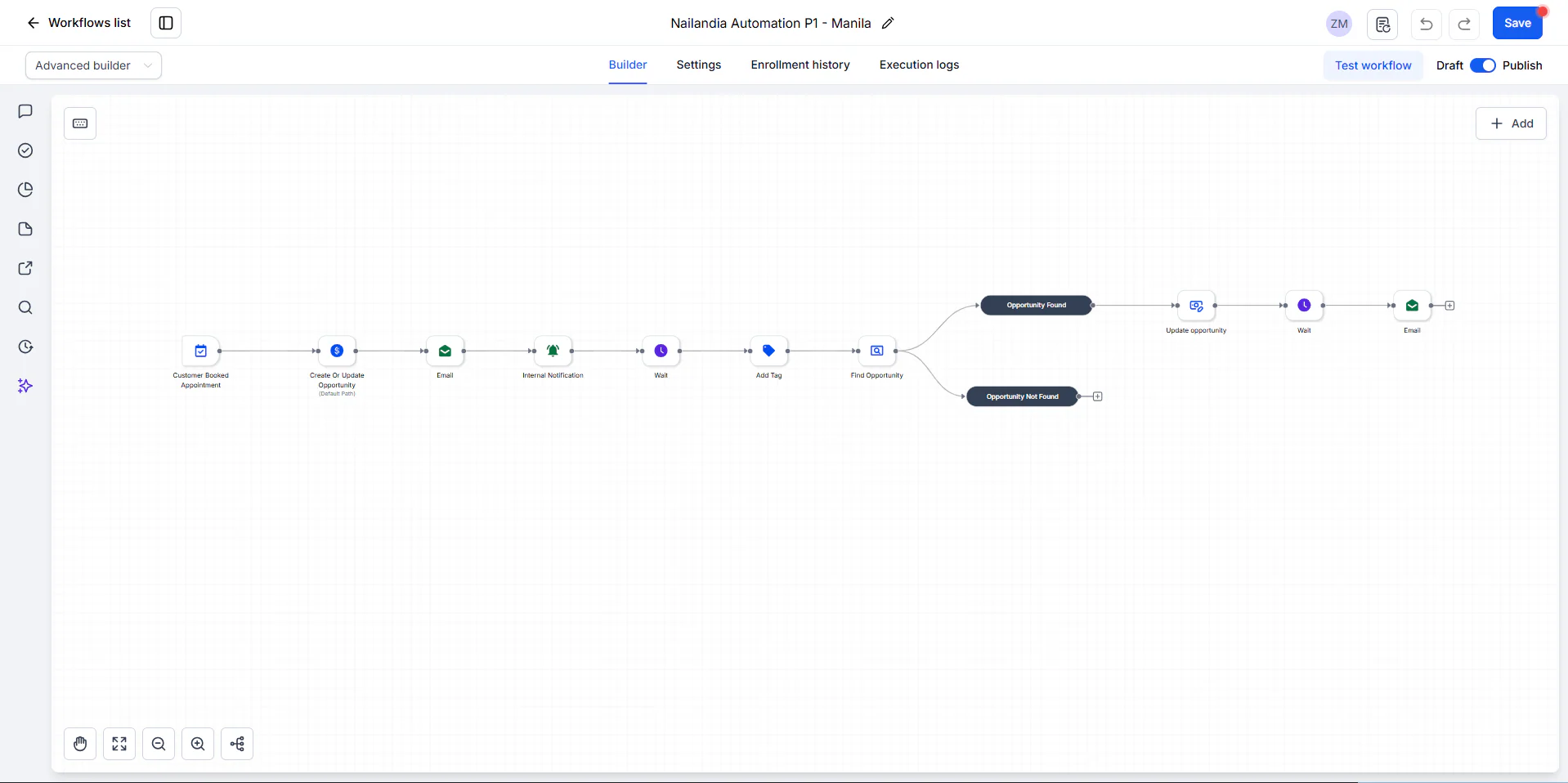
Image 1 of 3: Nailandia Automation P1 booking workflow in GoHighLevel
P2 and P2.2 are saved as drafts.
Overview
The problem. Without automation, confirming each booking, alerting staff, following up and keeping each customer's opportunity at the right stage are separate manual steps for every appointment.
What I built. I built three workflows. The first runs when a customer books: it creates or updates the opportunity, emails the customer and notifies the team, then after a wait tags the contact, finds the opportunity, updates it and sends a follow-up email. The second reacts to a trigger-link click by updating the opportunity and emailing the customer, or alerting the team if no opportunity exists. The third tags the contact and notifies the team when an appointment's status changes.
Why it helps. Every booking gets a confirmation and a follow-up, and the pipeline stays accurate without staff updating it by hand.
System flow
3 workflows
Nailandia Automation P1 - ManilaBooking → opportunity, email and alert → tag → follow-up.
- Nodes: Customer Booked Appointment. Next: Opportunity, email & alert.
- Nodes: Create Or Update Opportunity; Email; Internal Notification. Next: Wait, then tag.
- Nodes: Wait; Add Tag. Next: Find opportunity.
- Not found ends the path. Nodes: Find Opportunity. Next: Update opportunity.
- Nodes: Update opportunity. Next: Wait, then email.
- Nodes: Wait; Email. End of flow.